
Legenda q, j, p, y, ç
Legenda q, j, p, y, ç
.img-with-caption {
  position: relative;
}

.img-with-caption div {
  position: absolute;
  bottom: 0;
}<div class="img-with-caption">
<img src="[path-da-imagem.png]">
<div>
Legenda q, j, p, y, ç
</div>
</div>| <img style="display:inline"> | <img style="display:block"> |
|---|---|
|
Legenda q, j, p, y, ç
|
Legenda q, j, p, y, ç
|
O espaço-extra abaixo da imagem não é um bug. Por default, as imagens são display:inline. Isso faz com
que a borda inferior delas fique alinhada com o baseline do texto. De acordo com o MDN:
[...] when images are used in an inline formatting context with vertical-align: baseline, the bottom of the image will be posed on the container's baseline.
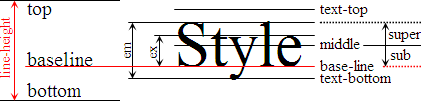
Para se livrar do "gap" sob a imagem, faça display: block.
Uma explicação mais completa está em: